



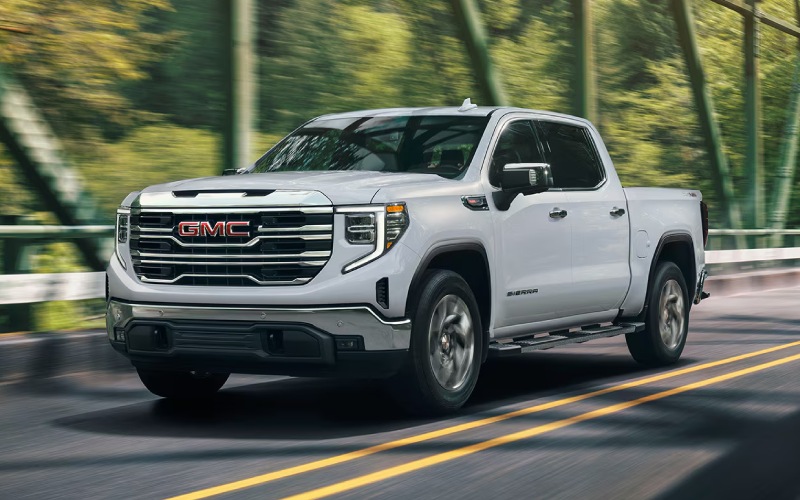
Wilcoxson GMC – Smarter Cabin Tech for Colorado Springs, CO Drives — Making the Most of the 2026 GMC Sierra 1500
The 2026 GMC Sierra 1500 gives drivers in Colorado Springs a digital cockpit that is both intuitive and genuinely helpful on fast-changing commutes. The combination of the 13.4-inch Premium GMC Infotainment System with Google built-in compatibility and the 12.3-inch Driver Information Center creates a three-screen experience—when paired with the available 15-inch multicolor Head-Up Display—that reduces distraction while elevating awareness. If you split time between morning runs along I-25, mid-day parking in Old Colorado City, and afternoon pickups on Academy Boulevard, the Sierra 1500’s interface feels like a co-pilot that keeps you a step ahead without getting in the way.
How the Screens Work Together Day to Day
Start with the center touchscreen. With Google built-in compatibility, you can use your voice to set a destination, pull up alternate routing around construction zones, or find a nearby coffee stop before your next meeting. That frees your hands and shortens the time your eyes are away from the road. The 12.3-inch Driver Information Center places critical data directly in the cluster—tire pressures before a quick climb toward the Air Force Academy, active driver-assistance status, or a clean, minimal layout for nighttime drives after a Switchbacks match. Add the available 15-inch multicolor Head-Up Display and core info like speed, turn-by-turn prompts, and safety alerts stay in your line of sight, which can be particularly reassuring on winding sections near Garden of the Gods or when traffic ebbs and flows on the fly.
What stands out is how seamlessly these displays coordinate. Navigation guidance lives where it makes the most sense—map detail on the center screen, next turn and lane guidance in the cluster or projected on the windshield—so you are not hunting for information. The result is less mental load and more focus on what is happening around you.
Wireless Integration That Feels Truly Wireless
Modern commuting often means juggling multiple devices. The Sierra 1500’s wireless phone projection keeps your compatible Apple CarPlay or Android Auto apps neatly connected without a tangle of cables. You hop in, your phone pairs, and your playlists, podcasts, and messages are in the same place you left them. It is a small detail until you experience a week without plugging in and realize how much smoother short, frequent stops become around Colorado Springs.
Beyond music and maps, the voice-forward approach shines. You can send a quick message, change your route, or search for a hardware store without looking down. In traffic where brake lights appear unexpectedly on I-25, that difference matters. Pair this with available Bose audio for clear calls and rich sound, and you get a cabin that acts as a relaxed, capable workspace between stops.
Trailering and Camera Tools That Simplify More Than Just Towing
Even if you do not tow every week, the Sierra 1500’s available ProGrade® Trailering System and integrated camera views add value in daily life. The in-vehicle Trailering App lets you set up trailer profiles and run checklists, but it also helps when you just need precise guidance while backing into a compact driveway in the Westside neighborhoods. Available High Definition Surround Vision can stitch together multiple camera views for a bird’s-eye perspective that takes the stress out of tight spots. If you do tow a small camper toward Mueller State Park or a utility trailer for home projects, these tools make hitching and monitoring feel more deliberate and less like trial and error.
And if longer distances are part of your routine, available Super Cruise® hands-free driver assistance on compatible roads adds another layer of ease. On stretches of I-25 where the system is supported, the Sierra 1500 can handle steering, braking, and acceleration under your supervision. When properly equipped, it is also designed to work while trailering on compatible routes, which can reduce fatigue during weekend hauls north toward Monument or south toward Pueblo.
Comfort and Control for the Front Range
Tech is only as good as the environment around it. The Sierra 1500’s seating choices—including available heated and ventilated fronts and, on Denali Ultimate, 16-way massaging front seats—help keep you fresh through longer days that start downtown and end with a grocery run in Briargate. Simple touches like a heated steering wheel, physical volume and climate controls, and thoughtfully placed storage make the cabin welcoming without asking you to relearn the basics.
Pair that with the Sierra 1500’s Selectable Traction Modes and, on Denali, Adaptive Ride Control, and you have a truck that can transition from smooth highway composure to more controlled travel on less-than-perfect side streets near Palmer Park. It is the right blend for a city where commutes vary from wide thoroughfares to neighborhood routes with frequent stops.
Which Trims Bundle the Right Tech?
If you are prioritizing the full-screen experience, SLE and up bring the 13.4-inch touchscreen and 12.3-inch Driver Information Center into play. Elevation adds a distinctive look with available Bose audio, while SLT layers in V8 power and upscale appointments. For hands-free capability and the most luxurious take on the Sierra 1500’s tech suite, Denali and Denali Ultimate offer Super Cruise® availability and premium materials that elevate every mile.
Every configuration benefits from the thoughtful integration of controls, clear menu structures, and steady performance across the system. That means even a quick adjustment—like switching audio sources or pulling up a camera view—feels second nature after a short time in the driver’s seat.
Answers to Common Colorado Springs Questions
Can I customize what appears in the Driver Information Center?
Yes. You can choose from display themes and select which metrics appear, letting you prioritize navigation prompts, driver-assistance status, efficiency details, or a simplified view for nighttime driving.
Does Google built-in require me to abandon my phone apps?
No. You can use Google built-in compatibility for native navigation and voice assistance while still taking advantage of wireless Apple CarPlay or Android Auto, depending on your preferences and device.
How does the Head-Up Display help during city driving?
By placing key info like speed, posted limits, and next-turn instructions in your line of sight, it reduces the need to glance down, which is especially helpful on congested streets or complex interchanges.
The Sierra 1500’s digital cabin is more than a checklist—it is a cohesive system that streamlines daily decisions. That is the difference you feel on Colorado Springs roads. Thoughtful screens, strong voice control, helpful cameras, and comfort-forward seating come together to make time behind the wheel feel calmer and more productive. If you are comparing trucks for everyday usability, this is where the 2026 Sierra 1500 quietly separates itself. Wilcoxson GMC is proud to be part of a broader community of drivers across Southern Colorado, serving La Junta, Canon City, and Colorado Springs with local guidance on trims and tech that match your routine.
Request more 2026 GMC Sierra 1500 information
Connect with us

